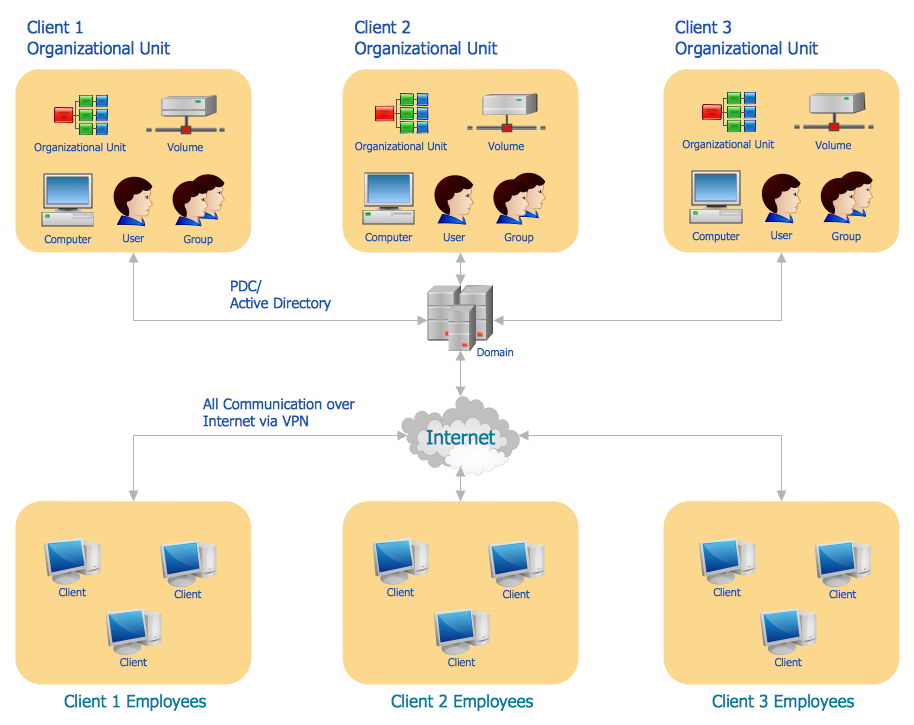
Example 1. Active Directory Diagram - Structure Diagram
Active Directory uses Lightweight Directory Access Protocol (LDAP). LDAP operates above TCP/IP and defines ways of address and access to objects between the client and Active Directory server. Accordingly to LDAP protocol each object in catalogue has its unique Distinguished Name, and this name distinguishes the object from other Active Directory objects and also prompts where the given object is located. Distinguished Name consists of common name (CN) and domain component – domain constituent. Common name defines an object or a container in which this object is positioned whereas the domain component defines the domain where this object is located. Besides in the distinguished name there could be indicated the organization which the object belongs to.
Logical elements of the Active Directory are objects, containers (OU), trees, domains and forests.
Object is a definite set of attributes having its unique name e.g. a user of the network. Accordingly to LDAP protocol, each object in the catalogue has its unique Distinguished Name and this name distinguishes it from other objects of Active Directory and also hints us where the given object is located.
Unlike the object, the container does not have physical presentation, and presents the totality of objects and other containers in the network structure.
The tree defines the hierarchy and ties between objects.
Domain is a separate safety area in the structure of the computer network. Correspondingly domains tree is the totality of domains connected between each other in a certain consecution. Domain tree can be presented in the form of a tree of established trusting relations between domains or in the form of the tree on the basis of a space of names.
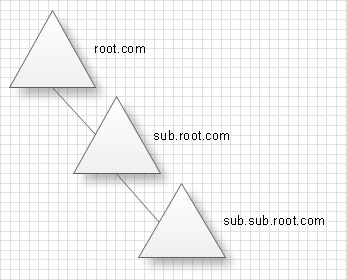
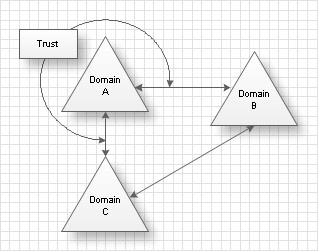
The forest is the totality of several trees which do not create uninterrupted area of names. All trees of the forest have the same scheme, configuration and global catalogue. All trees are connected by trusting relations by the Kerberos protocol. The forest in contrast to a tree must not have a distinguished name. The forest exists as the totality of objects, cross links and trusting relations by the Kerberos protocol, known to trees which form this forest.
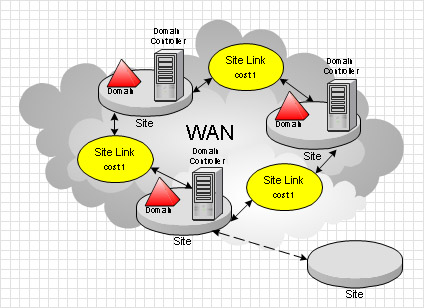
Site is a location in the network, where servers of services of Active Directory catalogues are kept. Active Directory diagram represents the scheme of correlations of service components with the preset degree of the detailed elaboration. For example this can be the level of objects or the level of sites.
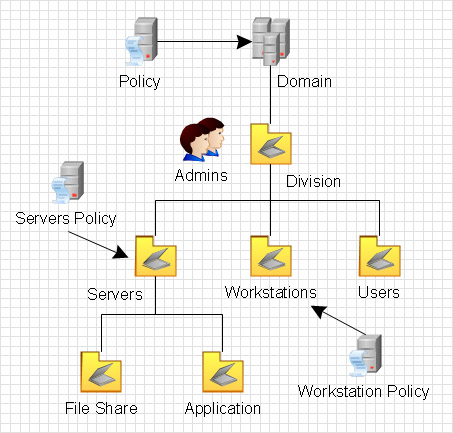
Designing the Active Directory Diagram in ConceptDraw DIAGRAM use the extensive drawing tools of the Active Directory Diagrams Solution, templates, samples, and variety of ready-to-use objects from the solution's libraries.
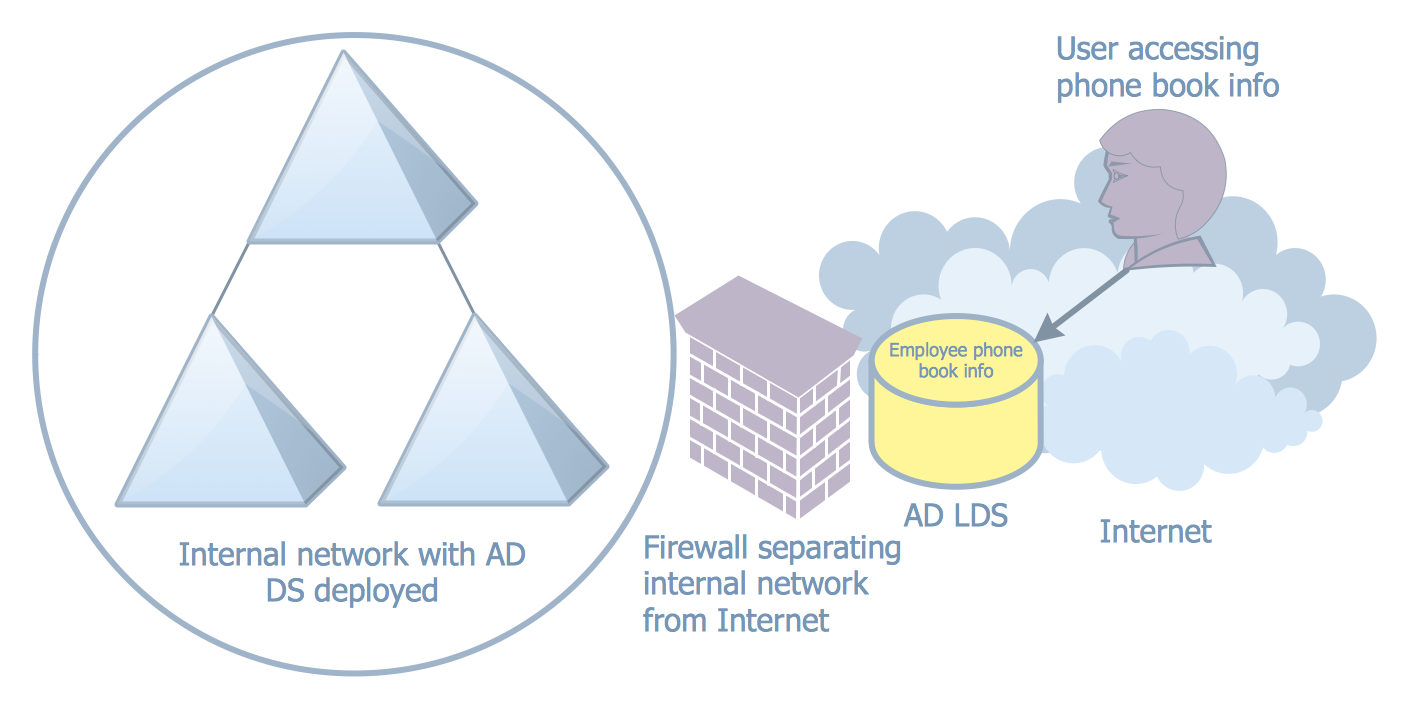
Example 2. Active Directory Diagram - AD LDS as a Phone Book Service
Active Directory Diagram also allows to present the network structure in graphical format using the vector elements and symbols that all can be found in Active Directory Diagrams Solution from the Computer and Networks Area of ConceptDraw DIAGRAM software and ConceptDraw STORE application is an inalienable part of our product developed especially for such purpose: to make life easier in terms of helping our clients grow and succeed in their business.
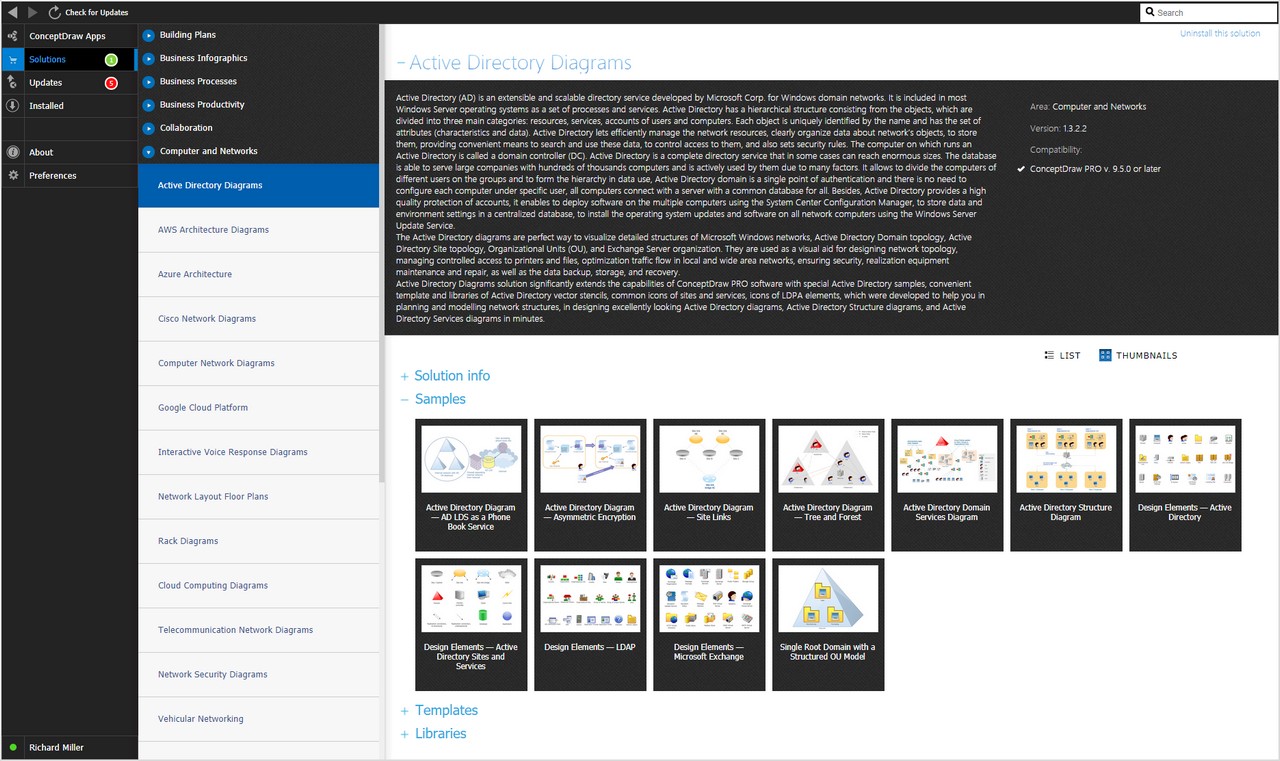
Example 3. Active Directory Diagram in ConceptDraw STORE
All source documents are vector graphic documents. They are available for reviewing, modifying, or converting to a variety of formats (PDF file, MS PowerPoint, MS Visio, and many other graphic formats) from the ConceptDraw STORE. The Active Directory Diagrams Solution is available for all ConceptDraw DIAGRAM or later users.
TEN RELATED HOW TO's:
This sample represents the actors, use cases and dependencies between them, and also the relationships between use cases. There are used dependency and use case generalization associations on this UML diagram. Use case generalization is used when you have two similar use cases, but one of them does more than another.
This sample shows the work of the Financial Trade sphere and can be used by trading companies, commercial organizations, traders, different exchanges.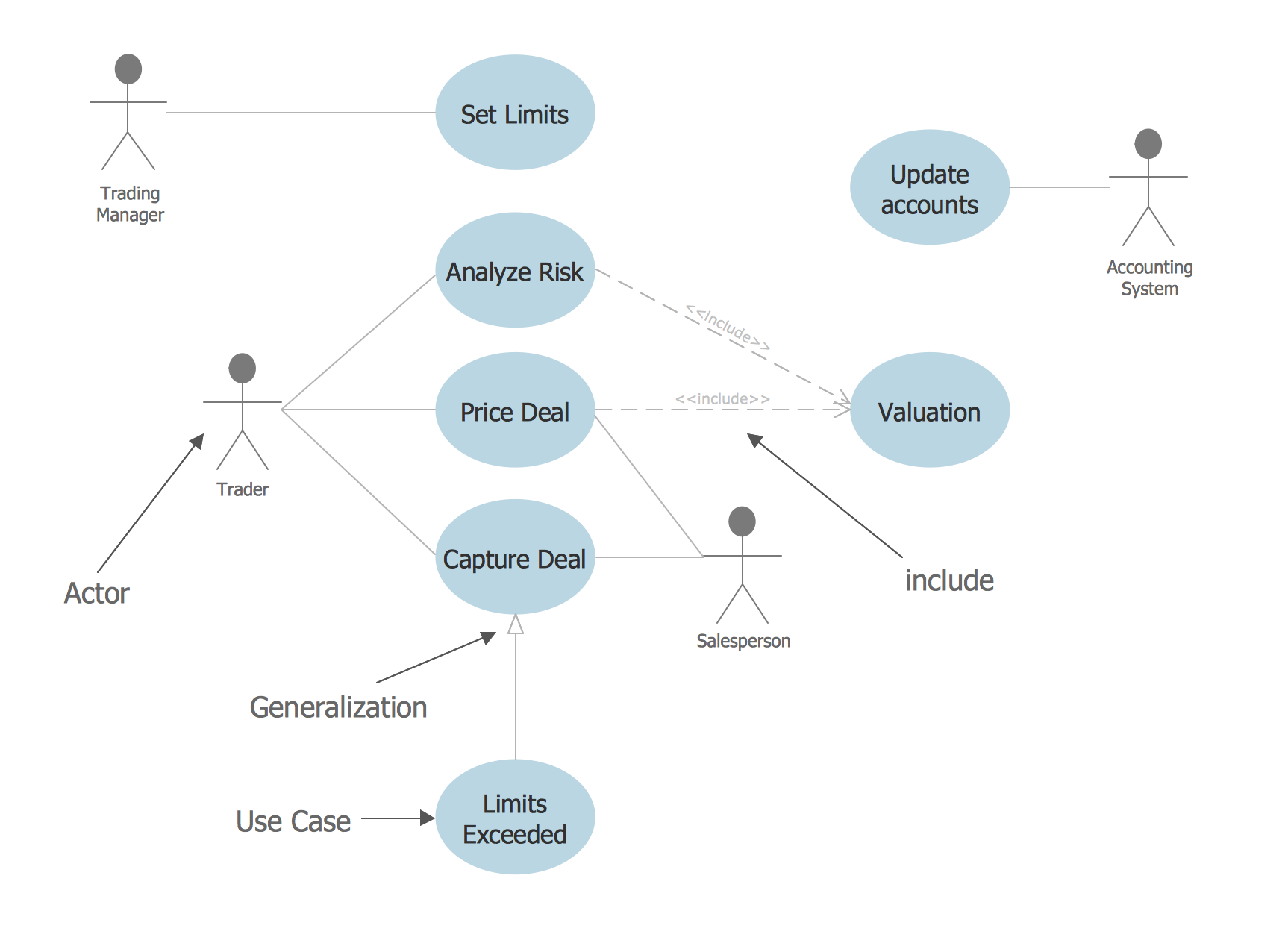
Picture: Financial Trade UML Use Case Diagram Example
The AWS Architecture Diagrams solution includes icons, sample and templates for several Amazon Web Services products and resources, to be used when creating architecture diagrams. The icons are designed to be simple so that you can easily incorporate them in your diagrams and put them in your whitepapers, presentations, datasheets, posters or any technical material you like.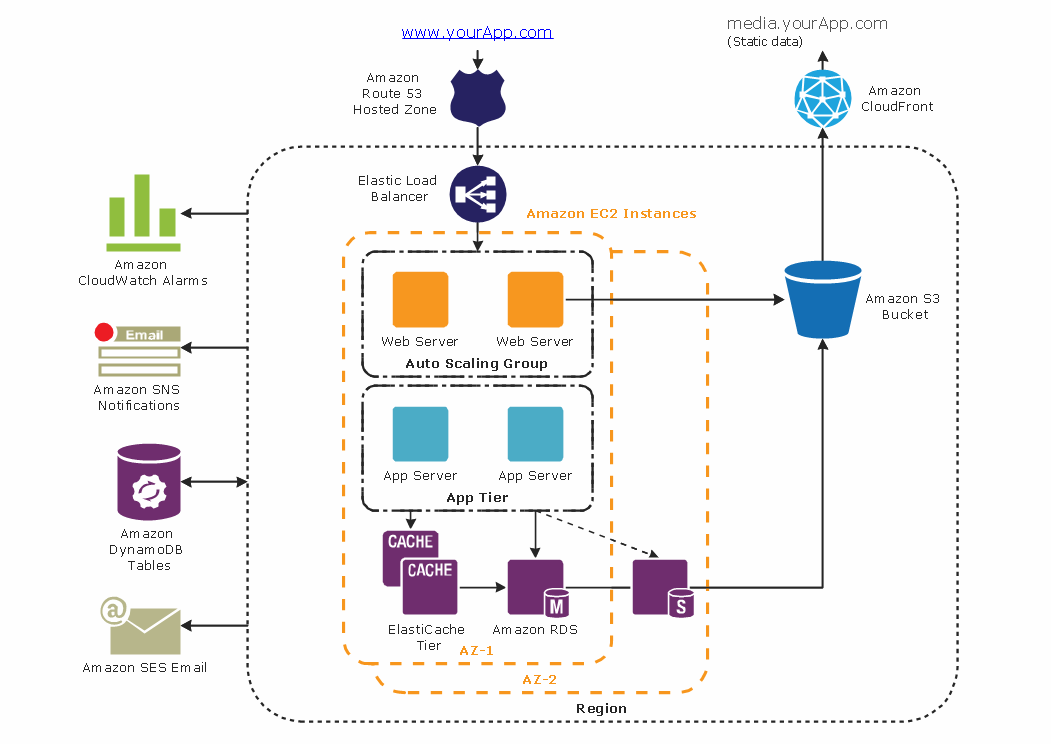
Picture: Diagramming tool - Amazon Web Servicesand Cloud Computing Diagrams
UML Communication Diagram depicts the interactions between objects or parts in terms of sequenced messages and describes both the static structure and dynamic behavior of a system.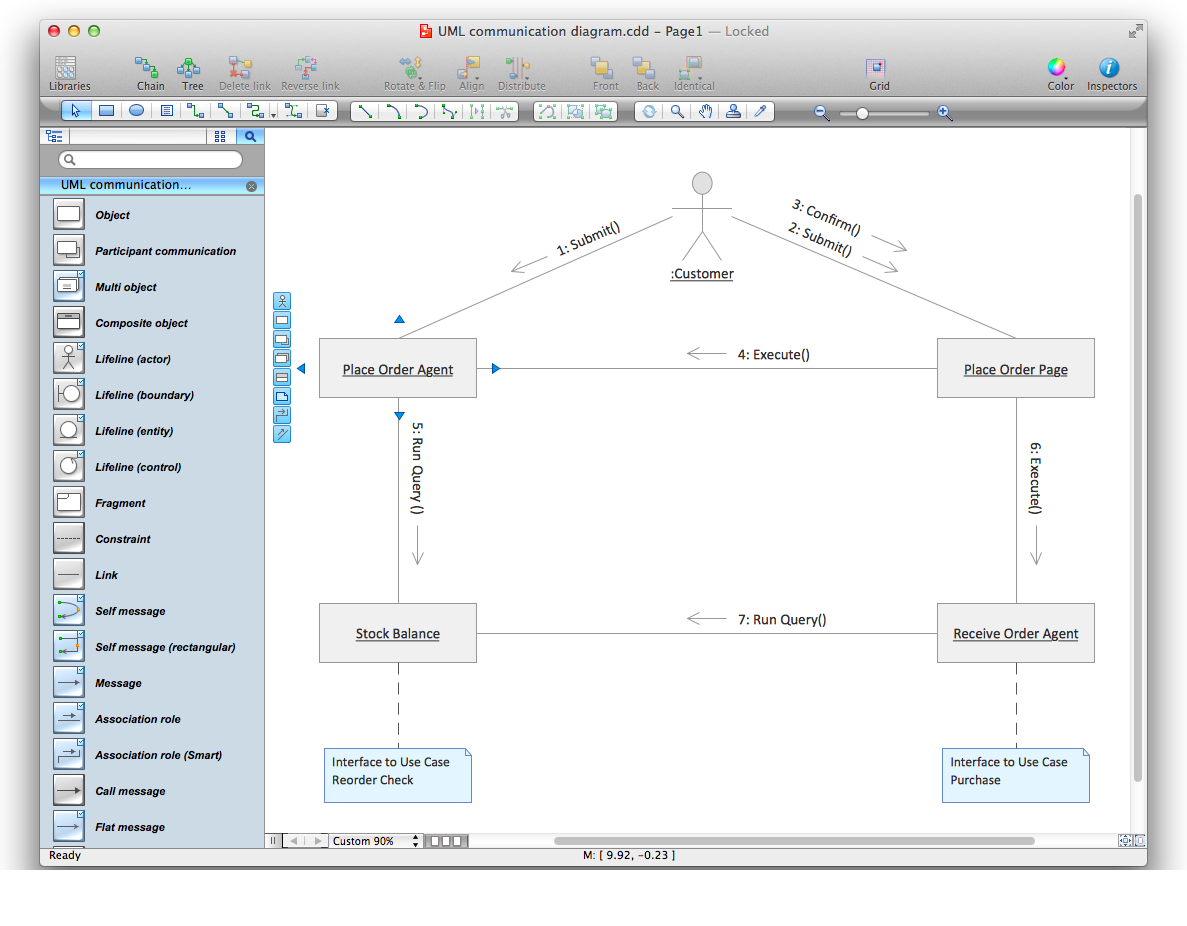
Picture: Diagramming Software for Design UML Communication Diagrams
Plumbing systems are very important for any manufacture, and it's a good practice to have a clear scheme of that system. To create one, you should use a piping and instrumentation diagram software with a possibility to save files in vector format, so you can print them without quality loss. ConceptDraw DIAGRAM is a great tool for creating diagrams, and you don't need to be very experienced to use it efficiently.
This example of Piping and Instrumentation Diagram (P&ID) depicts a scheme that illustrates the physical sequence and functional communications of piping, instrumentation and plumbing equipment components of a typical food trailer.
Seeking to avoid health troubles in a mobile food service , the plumbing demands for food trailers must be considered accurately. This P&ID shows all of piping including a basic set of piping system components along with multiple sinks, extra water heaters and other elements to meet health guidelines.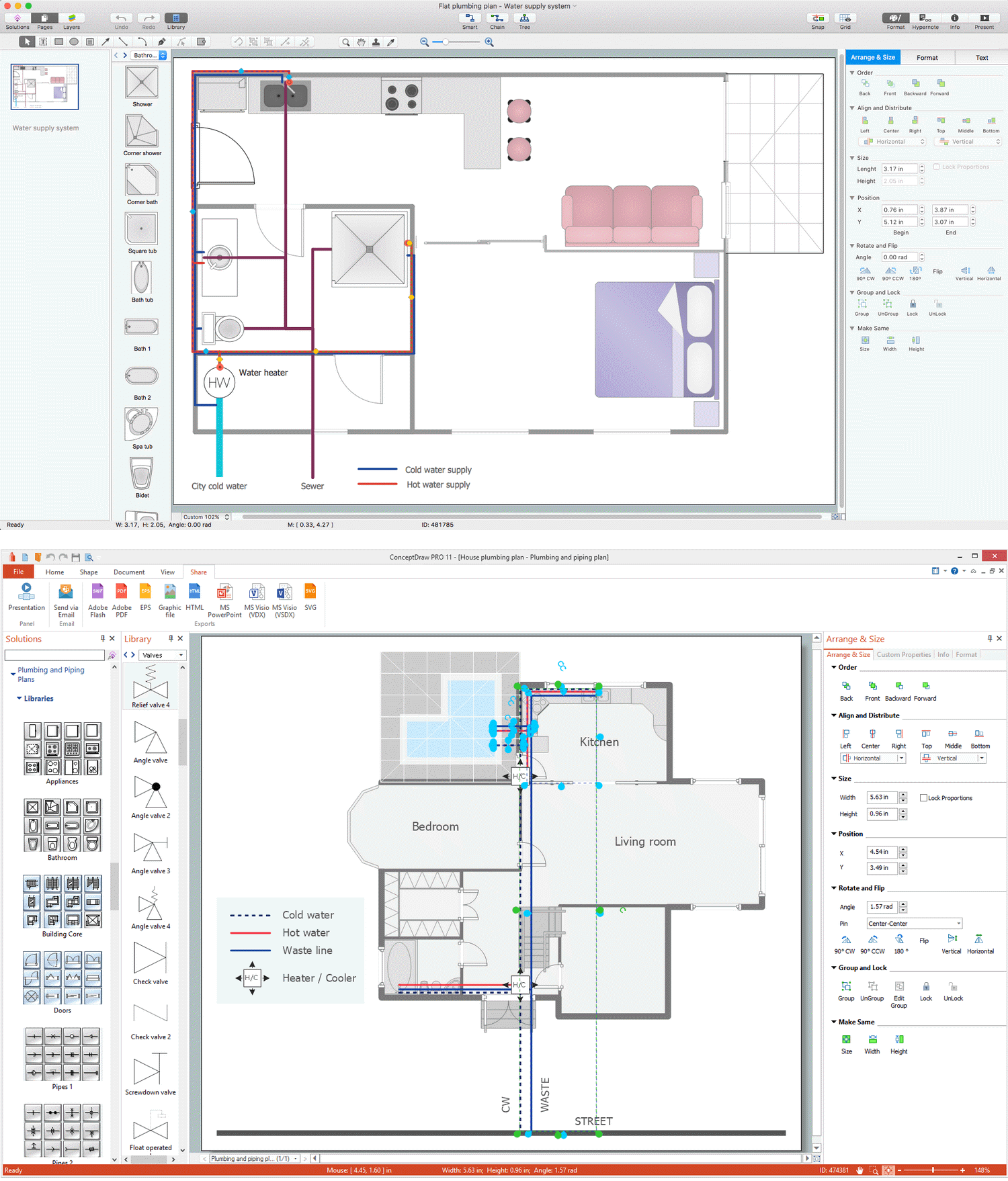
Picture: Piping and Instrumentation Diagram Software
Related Solution:
ConceptDraw DIAGRAM diagramming and vector drawing software offers the Pie Charts solution from the Graphs and Charts area of ConceptDraw Solution Park for quick and easy drawing the Pie Chart of any complexity.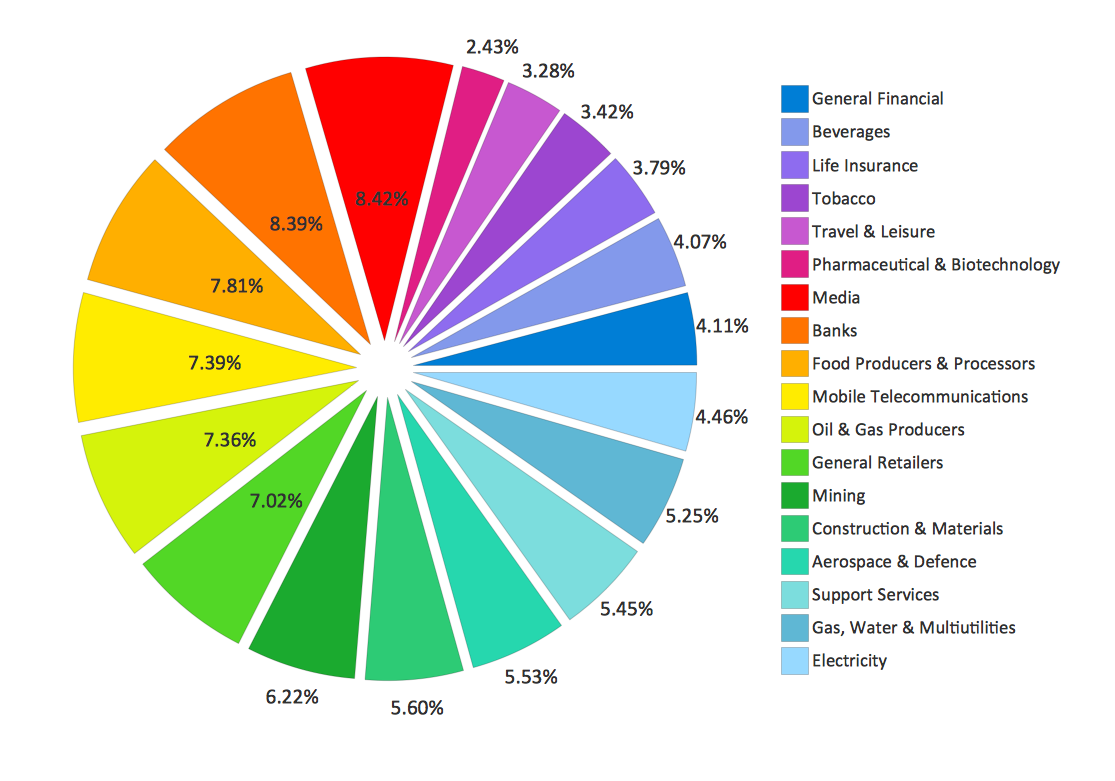
Picture: Pie Chart
Related Solution:
It is easy to recreate any informational system structure using diagrams. There are three main components of any ER diagram: entity, attribute and relationship. Basing on these three components, one can define other, less used elements, such as weak entity or relationship, derived attribute, recursive relationship etc.
This is the set of graphic elements of ERD Chen's notation. This ERD notation is used to represent an entity–relationship models. It involves the set of geometric forms: rectangles - depicting entities, ovals - representing attributes and diamonds depicting relationships assigned for first-class objects, that can have relationships and attributes of their own. Connections are displayed with arrowed lines. It is known that the Chen's ERD notation is used to show a detailed view of entities and relationships. ConceptDraw Entity-Relationship Diagram solution from the Software Development section of Solution Park provides the ability to create ERD of database structure for software development purposes using the Chen’s notation elements.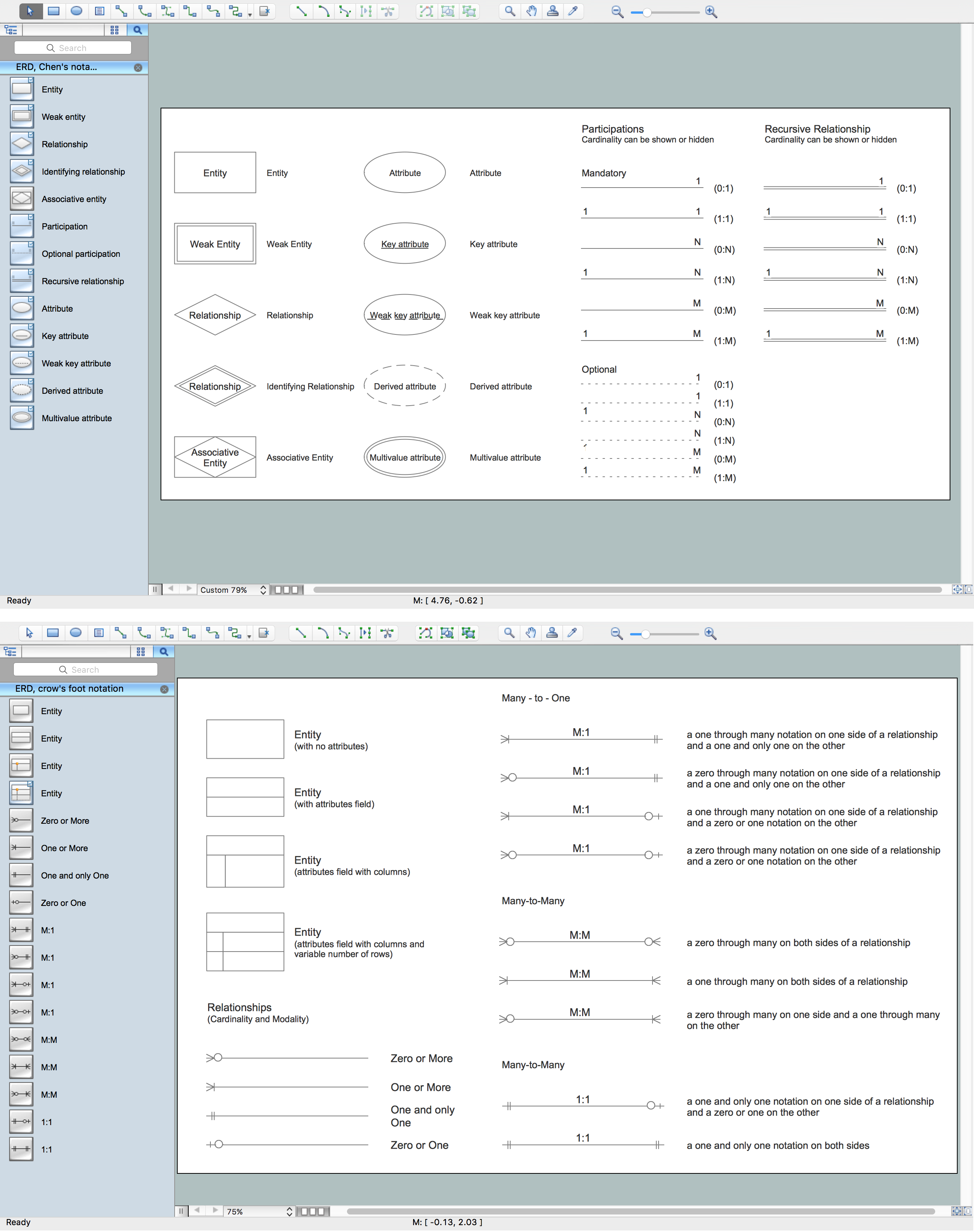
Picture: Components of ER Diagram
Related Solution:
Data flow diagrams are the graphical tool, used in the visualization of data flow of some data processing systems. It is the valuable process modeling tool. Also designing DFD is the important component of the initial part of any information system development project. The standard symbols are used to represent the interaction of a system components and how various kinds of components influence on data flow. The ConceptDraw Data Flow Diagrams solution is design to assist professional software engineers in making DFDs according to Gane and Sarson, and Yourdon and Coad notations.
Do you imagine yourself as a successful IT specialist? To your mind, they all use data flow diagram examples to learn and to get inspired. Aren’t you still with us?
Picture: Data Flow Diagram Examples
Related Solution:
Electrical plan is a document that is developed during the first stage of the building design. This scheme is composed of conventional images or symbols of components that operate by means of electric energy. To simplify the creation of these schemes you can use house electrical plan software, which will not require a long additional training to understand how to use it. You only need to install the necessary software ant it’s libraries and you’ll have one less problem during the building projection.
Any building contains a number of electrical systems, including switches, fixtures, outlets and other lightening equipment. All these should be depicted in a building electrical plans and included to general building documentation. This home electrical plan displays electrical and telecommunication devices placed to a home floor plan. On the plan, each electrical device is referenced with the proper symbol. Electrical symbols are used for universal recognition of the building plan by different persons who will be working on the construction. Not all possible electric symbols used on a certain plan, so the symbols used in the current home plan are included to a legend. The electrical home plan may be added as a separate document to a complete set of building plans.
Picture: How To use House Electrical Plan Software
Related Solution:
The ConceptDraw DIAGRAM Planogram Software and Retail Plan Software offers powerful tools of Enterprise Architecture Diagrams Solution for visualization the market analysis and easy making successful Retail Plans and Planograms with useful detailed recommendations about placing products and optimization the shelf space.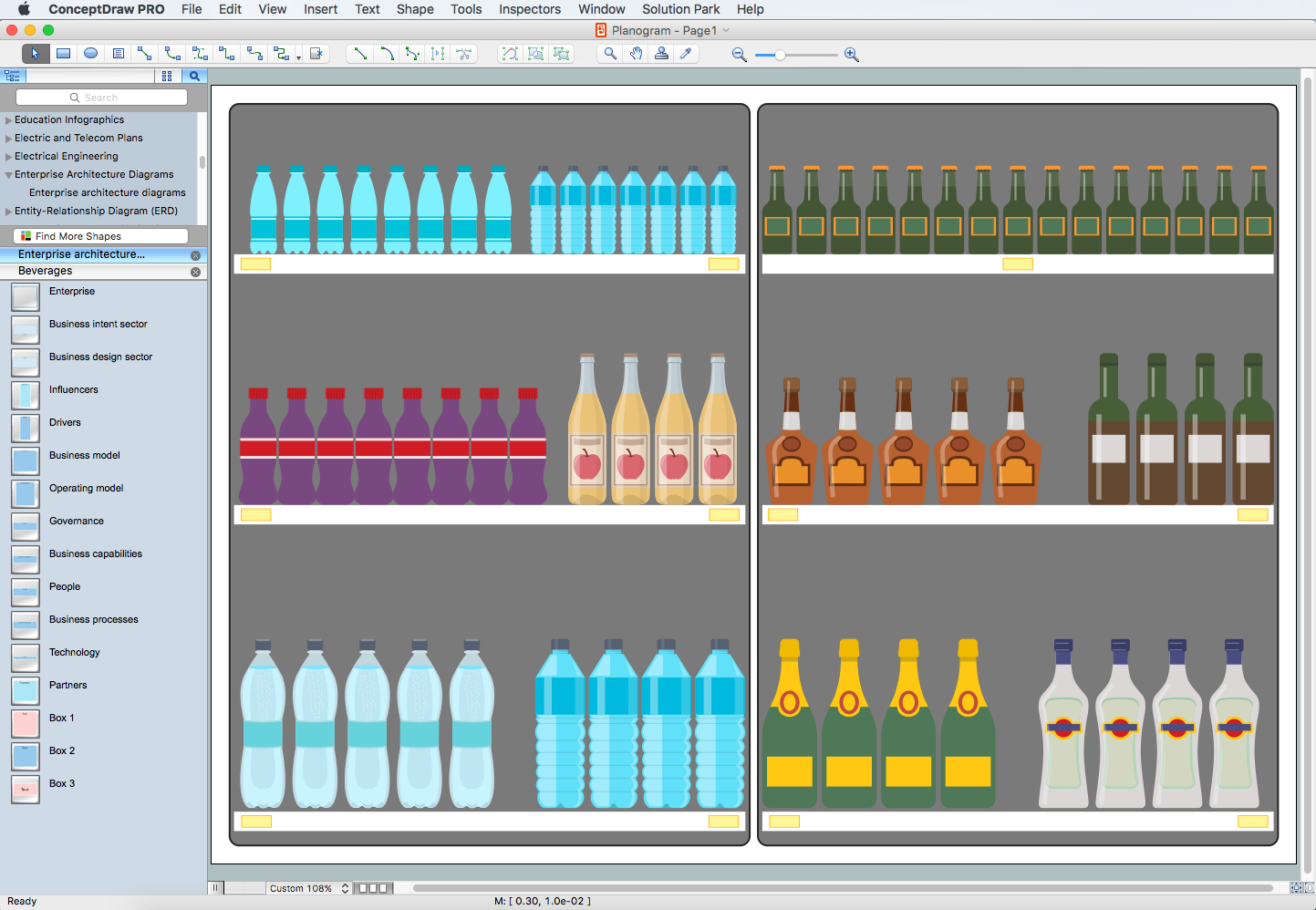
Picture: Planogram Software and Retail Plan Software
Related Solution:
An inductor, also called a coil or reactor, is a passive two-terminal electrical component which resists changes in electric current passing through it. It consists of a conductor such as a wire, usually wound into a coil. Energy is stored in a magnetic field in the coil as long as current flows. When the current flowing through an inductor changes, the time-varying magnetic field induces a voltage in the conductor, according to Faraday’s law of electromagnetic induction.
26 libraries of the Electrical Engineering Solution of ConceptDraw DIAGRAM make your electrical diagramming simple, efficient, and effective. You can simply and quickly drop the ready-to-use objects from libraries into your document to create the electrical diagram.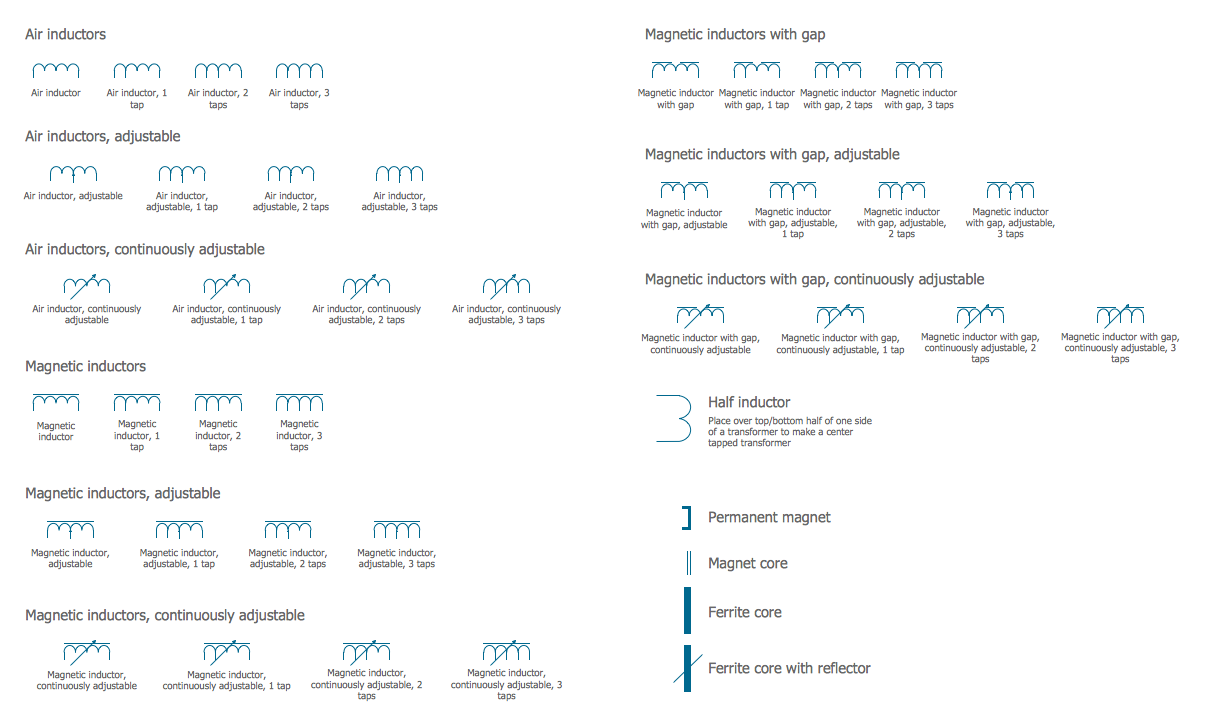
Picture: Electrical Symbols — Inductors
Related Solution:
